Understanding Credit Card Chargebacks
A chargeback is the reversal of a credit card payment initiated by a cardholder's bank. Chargebacks occur when a customer calls his or her credit card issuer and disputes a charge. Under the Fair Credit Billing Act, consumers can dispute a credit card charge for one of the following three reasons:
- Unauthorized purchases arising from fraud
- Billing errors
- Quality issues with a good or service, also known as "Friendly Fraud"
After receiving a dispute from the consumer, the card issuer initiates a chargeback transaction, which removes the disputed funds from the merchant's bank and credits them back to the consumer. Obviously, Chargebacks can be expensive for merchants—besides the cost of the good or service, the merchant must also pay a non-refundable, administrative chargeback fee to their acquiring bank even if they win the dispute. Additionally, too many chargebacks can make a merchant "high risk" for processors and banks, which could result in the termination of the merchant account or substantially increase the merchant's business expenses.
Fortunately, Forte has your back when it comes to fighting chargebacks. We keep the process transparent by tracking and processing disputes in the Disputes Datagrid of Dex. We also guide you when it comes to gathering and uploading documentation that supports your side. Once you've built your case, we re-present the chargeback to the credit card issuer on your behalf and notify you when a final decision is made and the funding entry is initiated.
Currently, Dex lets you work both full amount and partial amount disputes for Visa, Discover, MasterCard, and American Express. You can also respond to echeck chargebacks, also known as Proof of Authorization (POA) requests in Dex.
The Credit Card Dispute Process in Dex
The credit card dispute process can take up to 90 days to resolve, require multiple document submissions, and involve multiple funding adjustments before the final resolution. Merchants have 10 days to respond to a chargeback by either accepting it or disputing it with supporting documentation. For clarity's sake, the following figure displays the basic steps required for accepting or working disputes in Dex.
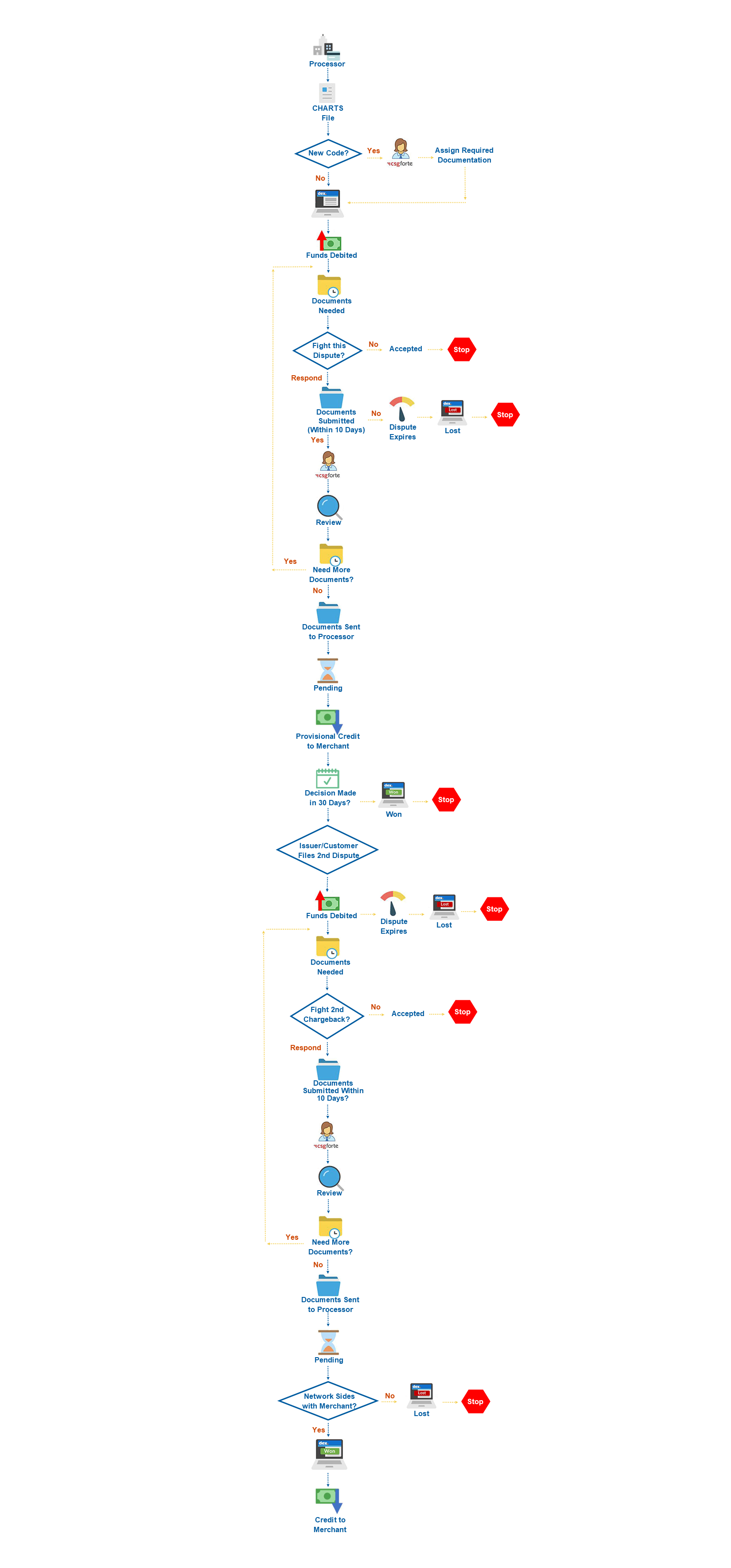
- Each day, credit card issuers submit new and updated Inquiry
 Card issuers use inquiries to investigate whether a cardholder's claim has merit to be filed as a dispute, which results in a chargeback. Merchants must provide information that proves the transaction was valid and that no furrther action is required., Chargeback A chargeback is the forced reversal of a transaction that is initiated by the cardholder and the card issuer., and Second Chargeback A second chargeback occurs when the first chargeback was reversed (in the merchant's favor) and the cardholder chooses to continue the diispute and file for arbitration. Once in arbitration, the card network (Visa, MasterCard, or Discover) reviews all documentation from both sides and makes a final decision on which party is responsible for the chargeback. Forte assesses a minimum $500.00 fee for re-presenting second chargebacks. Consider this when deciding whether or not to re-present the transaction. requests from their cardholders to Forte's processor. This file contains both partial- and full-amount disputes, which Forte uploads into Dex. Once uploaded, Forte will send you an email notification about the dispute. If no action is taken on a dispute with a Documents Needed status, Dex will send reminder emails to users that have subscribed to the Documents Needed notification after 5 days and 9 days.
 - After logging into Dex, you can access the Dispute's Detail Screen to view the original transaction, reason code, due date, and documentation required to fight it.
- From here, you have two options when settling disputes:
- You can accept the dispute, which puts the dispute record into the final Accepted status. Once accepted, the disputed amount is debited from your bank account back to the cardholder.
- You can work the dispute by uploading the documentation listed in the Items Needed tab of the Dispute's Details Screen (e.g., a signed imprint of the card, proof of delivery, cardholder signature on the pickup form, IP address and/or email address of the purchaser, etc.). After uploading the required documentation, you'll submit the dispute for review. Forte reviews your evidence and then sends it to the card issuer for the final decision. At this time the dispute goes into Pending status and can remain there for up to 61 days while the issuer reviews the evidence provided by you and the cardholder. If the issuer sides with the cardholder, the dispute goes into Lost status and the disputed amount is debited from your bank account back to the cardholder. If the issuer sides with you, the dispute goes into Won status and the disputed amount is credited back into your bank account.
Won and Lost dispute statuses are not necessarily the final status. The cardholder has the option to continue to dispute the payment amount by filing for arbitration, which results in a second chargeback. Second chargebacks are more expensive to fight and rely on the card networks (Visa, MasterCard, American Express, or Discover) rather than the card issuers to provide the final decision. This final decision must be accepted by all parties and results in the final funding adjustment.
Multiple funding adjustments can occur throughout the lifecycle of the dispute depending on the merchant organization's set Funding Mode. For organizations set up in the Immediate Funding Mode, Dex makes Net-Funded Net funding is when all debit transactions (money moving into the merchant's account) and credit transations (money moving out of the merchant's account) are added together, resulting in one funding entry in the merchant's ledger. funding adjustments as soon as a funding condition is provided in the issuer-submitted Disputes File. For organizations set up in the Deferred Funding Mode, Dex makes net-funded funding adjustments when the dispute is resolved. For more information on how your organization's Funding Mode is set up in Dex, contact your Admin.